AI Image to Video Generator
Turn a still photo into a short video clip — describe the motion and the AI animates it.
Runs on credits · Results straight away · Nothing stamped on your result
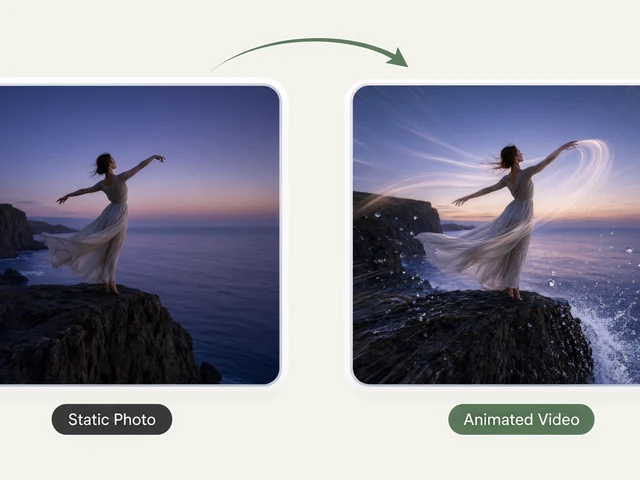
The AI Image to Video Generator turns one still photo into a short video clip. The people, objects and scene in your photo start to move naturally: hair and clothes stir, the light shifts, and the camera can glide, zoom or circle around the subject, as if the moment had been filmed instead of photographed.
You steer the motion: choose a camera move, how fast it goes and the mood of the clip, from calm and dreamy to cinematic or energetic, or describe the motion in your own words. Each clip is 5 seconds long at 720p, keeps your photo's framing, and is made to look like real footage rather than animation.
How to use the AI Image to Video Generator
- Upload a sharp photo with a clear subject.
- Pick a camera motion: pan left or right, zoom in or out, or orbit.
- Set the motion speed (slow, medium or fast) and the tone (cinematic, dreamy, energetic or calm), or describe the motion yourself.
- Run it with credits; video is not on the free queue.
- Download your 5-second clip.
What people use it for
Bringing old photos to life
Add gentle motion to a family photo or a portrait for a memorial slideshow or a birthday video.
Social media posts
Turn a still into a short moving clip for Reels, TikTok or Stories, where motion gets more attention than a photo.
Product and property teasers
A slow zoom or orbit around a product shot or a room photo makes a simple, eye-catching teaser.
Travel and landscape photos
Let clouds drift and water move in a holiday photo for a living postcard.
Tips for the best result
- Sharp, well-lit photos animate best; blur and noise get more noticeable once things move.
- Slow camera moves look the most natural. Save fast motion for energetic, action-style clips.
- Photos with some space around the subject leave room for the camera to move.
- Restore or upscale an old or small photo first, then animate the cleaned-up copy.
Frequently asked questions
How long is the video?
Each clip is 5 seconds long, at 720p.
Does it work on old photos?
Yes. Old portraits and family photos animate well, especially after a pass through AI Old Photo Restoration to remove scratches and noise.
Can I describe the motion myself?
Yes. Use the camera, speed and tone options, or write the motion you want in your own words.
Is the AI Image to Video Generator free?
Not on the free queue. AI Image to Video runs on credits only, because a video clip costs far more to generate than a still image. The price of a clip is shown on the button before anything runs. The 25 free credits new accounts get cover several image tools but not a video clip.
Will my result have a logo or text on it?
No. What you download is clean, whether it ran on the free queue or with credits.
Who owns the result, and can I use it commercially?
You own the images generated for you, under our Terms of Service, subject to the rights of anyone shown in the photos you upload. Only upload photos of people who have agreed to it.
What happens to the photos I upload?
They are used only to create your result, and uploads and results are deleted on the schedule set out in the Retention section of our Privacy Policy.